Basic, Free
Core Hardening Audit checks for 1 site, surfacing the most important insecure defaults out of the box.

Hardening Audit checks your WordPress configuration against the attacks bots try first, then tightens it. Disable file editing, block XML-RPC abuse, hide version info, and fix insecure defaults, all from a single one-click checklist.
Hardening Audit is a WP Tailwatch feature that audits and tightens core WordPress settings against common attacks. From a one-click checklist it disables the file editor, blocks XML-RPC abuse, hides version info, and fixes insecure defaults, closing the configuration gaps attackers probe before they find a way in.
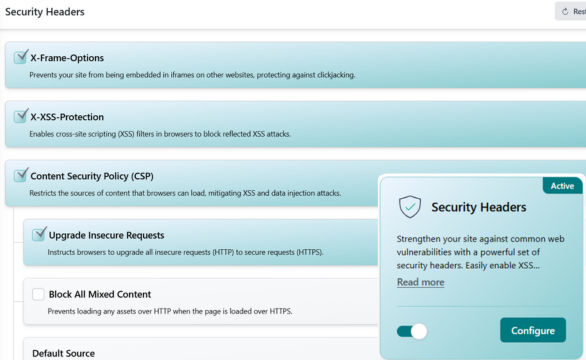
WordPress ships with convenient defaults that quietly widen your attack surface. Hardening Audit walks the high-risk settings, shows you what's exposed, and lets you fix it all from one checklist instead of editing config files by hand.
Connect your site once and Hardening Audit does the rest. It inspects your core settings, shows you exactly what is exposed, and tightens everything from a single checklist.
Hardening Audit inspects your core WordPress configuration, the file editor, XML-RPC endpoint, version exposure, and other defaults that attackers fingerprint and exploit.
Each risky setting is laid out as a clear checklist item with plain-English context, so you know exactly why it matters before you change anything.
Apply the recommended fixes individually or all at once. Your site tightens up instantly, and you can re-run the audit any time to confirm it stays hardened.
Security misconfiguration is one of the most common web application risks, OWASP ranks it among its Top Ten, and WordPress's convenience-first defaults are a textbook example. Source: OWASP Top Ten. An enabled file editor, an open XML-RPC endpoint, and exposed version numbers each hand attackers a head start they don't deserve.
Hardening Audit closes those gaps before they're exploited. Instead of hunting through wp-config and functions.php, you get a single checklist that audits every high-risk setting and tightens it in one click. That's the WP Tailwatch approach: secure defaults made effortless, repeatable across every site you run.
Start tightening your settings for free, scale up across every site you manage.
Core Hardening Audit checks for 1 site, surfacing the most important insecure defaults out of the box.
The complete one-click hardening checklist with re-audits and granular toggles for 1-20 sites, paired with the full WP Tailwatch security suite.
Consistent hardening across 21-1,000 sites with tiered volume pricing and one dashboard for your whole portfolio.
Hardening Audit pairs with the rest of WP Tailwatch, replacing 23+ separate plugins with one platform.
Straight answers on what Hardening Audit changes, why it is safe, and how it works across the free and paid plans.
Hardening Audit scans your core WordPress settings against a checklist of common attack vectors and tightens them. It disables the file editor, blocks XML-RPC abuse, hides version info, and fixes insecure defaults, closing the gaps attackers probe first, all from one screen.
WordPress ships with permissive defaults built for convenience, not security. Settings like the built-in file editor and open XML-RPC endpoint are useful but risky. Hardening Audit closes those gaps so security misconfiguration, one of the most common web risks, does not leave your site exposed.
No. Disabling the built-in theme and plugin file editor only removes the in-dashboard code editor, a favorite target for attackers who steal an admin login. You still edit files over SFTP or your host's file manager, so legitimate workflows are unaffected.
XML-RPC is a legacy WordPress interface that bots abuse for brute-force amplification and pingback DDoS attacks. Most modern sites do not need it. Hardening Audit can block or restrict XML-RPC so attackers lose a common entry point without breaking everyday publishing.
Yes. Hardening Audit is fully available now as part of WP Tailwatch, there is no waitlist or beta. Core hardening checks are included on the free Basic plan, with the full one-click checklist on the Business and Agency plans.
A standalone hardening plugin only tweaks settings on one site. Hardening Audit applies a consistent checklist across every site you manage and is one of 23+ tools in WP Tailwatch, so you replace a single-purpose plugin and dozens of others with one platform.
On its own, hiding your WordPress and plugin version numbers is not a silver bullet, but it removes easy reconnaissance. Bots that fingerprint outdated versions to target known exploits get less to work with, which is why it is part of a layered hardening checklist.
Yes. From the WP Tailwatch mobile app and cloud dashboard you can run Hardening Audit and apply fixes for every site you own in one place, which is ideal for agencies keeping many WordPress installs hardened to the same standard.
Yes. Hardening Audit closes configuration gaps at the WordPress layer, while WP Tailwatch's Firewall and Security Headers block malicious requests in transit. Together they give you defense in depth, secure settings underneath, active filtering on top.
Disable risky defaults, block XML-RPC abuse, and hide version info from a single checklist. Re-audit any time. Start free today.